See the queue before it builds
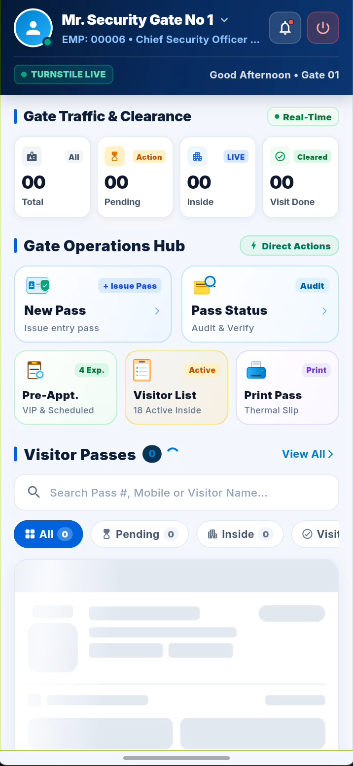
Review Total, Pending, Inside, and Visit Done from the gate dashboard, then jump into New Pass or Visitor List when action is needed.
Plant Gate VMS gives security teams one guided visitor flow: prepare for appointments, issue walk-in passes, capture identity and host details, then follow each visit through entry and exit. The dashboard makes Pending, Inside, and Visit Done status easy to scan at the gate.
Replace scattered checkpoints with a flow that connects the visitor, their host, their destination, and their gate status.
Review Total, Pending, Inside, and Visit Done from the gate dashboard, then jump into New Pass or Visitor List when action is needed.
Record government ID, visitor contact, optional company and vehicle details, portrait, host, unit, and visiting area as part of pass creation.
Follow a pass from pending to on-site, then mark the visit done at checkout so the team can see who is still inside.
These supplied app screens show the actual gate workflow, from authorized staff access to advance booking and pass creation.
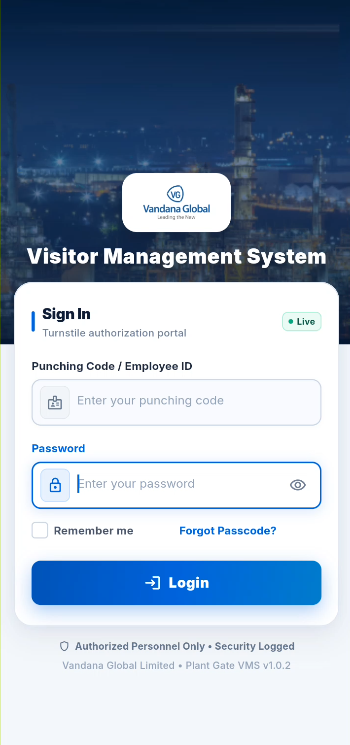
A security-gated sign-in portal for authorized personnel at the visitor clearance desk.
A live overview of total, pending, on-site, and completed visits with shortcuts to gate actions.
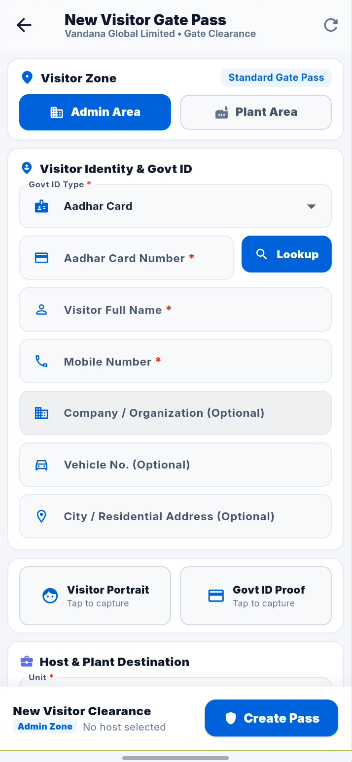
Select Admin or Plant Area, identify the visitor, capture photo and ID proof, and assign a host and destination.
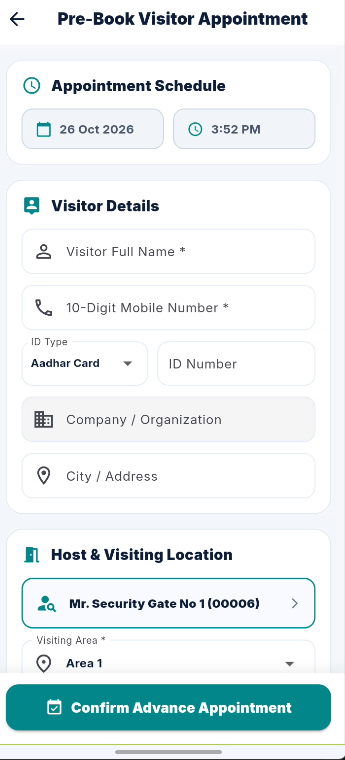
Schedule an advance appointment with a date and time, visitor details, host, and visiting area.
The pass form connects who is visiting with where they are going and what the gate team needs to verify.
One record follows the visitor from pass creation through gate entry, on-site status, and exit clearance.
Authorized security staff sign in with their employee or punching code and password before using the gate clearance portal.
Start a New Pass for a walk-in, or review a Pre-Appointment. Choose the visitor zone, then record identity and contact details.
Look up the government ID, capture the visitor portrait and ID proof, select the host and destination, then create and print the pass.
Use Pass Status and Visitor List to see pending and on-site visits. Record check-out at departure so the visit moves to Visit Done.
Workflow details are based on the supplied Plant Gate VMS screens and the visitor check-in/check-out use case.
The same clearance flow supports scheduled arrivals, walk-ins, and monitoring people who are still inside the premises.
Security staff create a pass when a visitor arrives, capture identity evidence, route them to the correct zone, and record the gate entry.
Teams can pre-book a visitor with a scheduled date and time, host, and visiting location so reception can review the expected arrival.
The pass workflow distinguishes Admin Area and Plant Area destinations, helping gate staff route each visit to the selected location.
The dashboard separates Pending, Inside, and Visit Done states so staff can monitor active visitors and close the record at check-out.
Talk through your visitor zones, ID checks, appointment flow, pass fields, and checkout routine with our team.
AI sales consultant